
Solve a captcha in Python: quick start
This page takes you from a fresh clone to a prediction. The model reads E-captcha text images: five letters from a 19-letter alphabet on a 200 x 50 grayscale image.
Install
Clone the repository and install the four Python requirements: torch, torchvision, pillow and numpy.
git clone https://github.com/halitsever/e-captcha-solver.git
cd e-captcha-solver
pip install -r requirements.txt
On a machine without a GPU you can ask pip for the CPU build of PyTorch, which is what the project's CI does:
pip install --extra-index-url https://download.pytorch.org/whl/cpu -r requirements.txtAdd the weights
The repository does not include a trained model. Weight files (*.pt, *.pth, *.onnx, *.ckpt) are gitignored. Train one with train_ctc.py and put the result in the project root as ctc_model.pt. Every script looks for that name by default.
Read an image from the command line
python solve_ctc.py captcha.jpg
# captcha.jpg   hvnyf   0.99
Each line of output has three tab-separated fields: the file name, the predicted text and a confidence value.
solve_ctc.py accepts any number of inputs. An input can be a file, a glob pattern or a folder. For a folder it reads every .jpg and .png inside it. Use --model to point at a different checkpoint:
python solve_ctc.py samples/ --model ctc_model.ptThe ten images in samples/ carry their labels in the file name, so this command is a quick check that a model works. sample_01_merbc.jpg should come back as merbc.
| No. | Input image, 200 x 50 | Label |
|---|---|---|
| 01 |  | merbc |
| 02 |  | tkcdv |
| 03 | 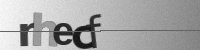 | rhecf |
| 04 |  | mjufv |
samples/. The label is the ground truth from the file name.Call it from your own code
infer.py wraps the model in one class.
from infer import CaptchaSolver

solver = CaptchaSolver("ctc_model.pt")
text, conf = solver.solve("captcha.jpg")     # also takes a PIL image
text, conf = solver.solve_bytes(response.content)
CaptchaSolver loads the weights once in its constructor. It uses CUDA when PyTorch can see a GPU and the CPU otherwise. Pass device="cpu" to force one. solve takes a file path or a PIL.Image. solve_bytes takes raw image bytes, for example the body of an HTTP response.
What happens to the image
Any input size works. preprocess in model_ctc.py converts the image to grayscale, resizes it to 200 x 50 and scales the pixel values to the range [-1, 1]. The resize does not keep the aspect ratio, so images with a very different shape will be stretched.
Reading the confidence
The confidence is the highest softmax probability at each of the model's 50 time steps, averaged over all 50. It describes the whole string. It is not a per-letter score.
Two checks are worth doing on every result:
- Compare the confidence with a threshold and retry the weak ones.
pseudo_label_ctc.pyuses 0.97 when it decides which predictions to keep as training labels. - Check that the text has exactly five letters. Greedy decoding can return a shorter or longer string when the model is unsure.
Next steps
- Captcha solver API with FastAPI to call the model over HTTP.
- ONNX export and Node.js inference to run it without Python.
- CRNN explained for what the network does with the image.